Enterprise Administration
The Enterprise Administration portal provides subscription and seat management capabilities for Bear Decisions enterprise subscriptions purchased through Microsoft.
⚠️ Enterprise Subscriptions Only
The Enterprise Administration portal is available exclusively for those who have purchased an enterprise subscription via Microsoft (either through the Microsoft Marketplace or Azure).
Access to the admin portal is restricted to the purchaser only and automatically leverages Microsoft SSO for secure authentication, ensuring that your information is protected.
Portal Overview
The Enterprise Administration Portal provides a comprehensive view of your subscription and seat management. Here's what you can see and do:
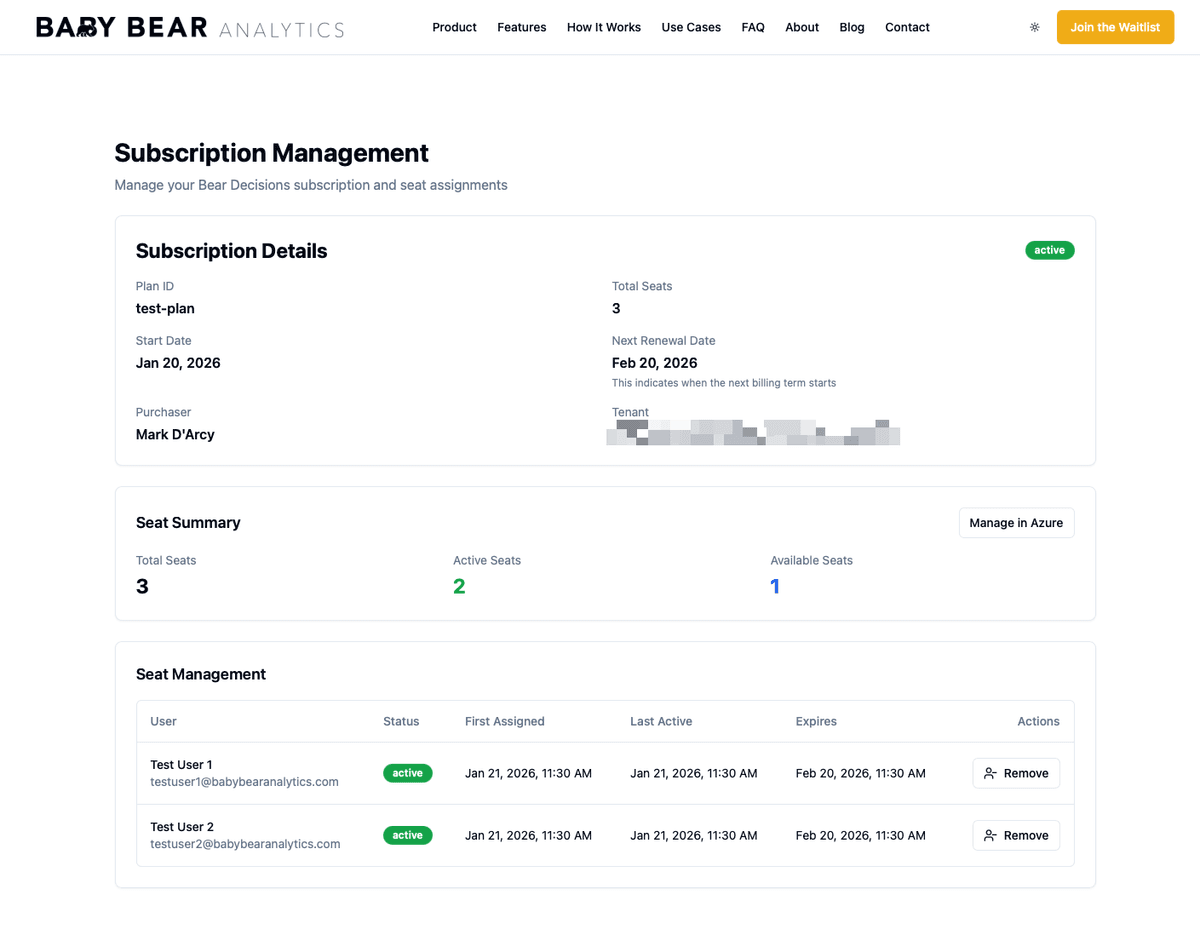
Subscription Details
The portal displays key information about your subscription:
- Plan ID: Your specific subscription plan identifier
- Start Date: When your current subscription period began
- Purchaser: The individual who purchased the subscription (this is the only person with admin portal access)
- Total Seats: The number of seats included in your subscription
- Next Renewal Date/End Date: When your next billing term starts, or alternatively, when your subscription ends if auto-renew is disabled in Azure
- Tenant: Your linked organizational tenant (for Microsoft integration)
Seat Management
The portal provides detailed seat management capabilities:
- Total Seats: The overall number of seats in your subscription
- Active Seats: The number of seats currently in use
- Available Seats: The number of unassigned seats available for new users
💡 Azure Integration
You can also manage your subscription directly in Azure by clicking the "Manage in Azure" button in the Seat Summary section.
Individual Seat Details
The Seat Management table shows detailed information for each seat:
- User: The name and email address of the user assigned to the seat
- Status: Whether the seat is currently active
- First Assigned: When the seat was first assigned to the user
- Last Active: The most recent activity timestamp for the user
- Expires: When the seat assignment expires (typically aligned with your subscription renewal date)
- Actions: Options to manage the seat, including the ability to remove a user
Removing Users
Administrators have the ability to remove users from active seats. This can be useful when:
- A user no longer needs access to Bear Decisions
- You need to free up a seat for a different user
- A user has left your organization
⚠️ Important: Seat Retention Policy
Unless a user is manually removed (kicked), seats are retained for one month following their last usage before being automatically released. This means that even if a user stops actively using Bear Decisions, their seat will remain assigned for 30 days after their last activity.
Free Trials for New Users
If all seats in your subscription are currently taken, new users will automatically receive a 14-day free trial when they first access Bear Decisions. This allows them to evaluate the platform while you determine if you need to add additional seats or reassign existing ones.
Need Help?
If you have questions about managing your enterprise subscription or need assistance with seat assignments, please contact our support team at mark@babybearanalytics.com.